
Viaplay Banner Automation System
One intelligent After Effects setup instead of a small museum of templates
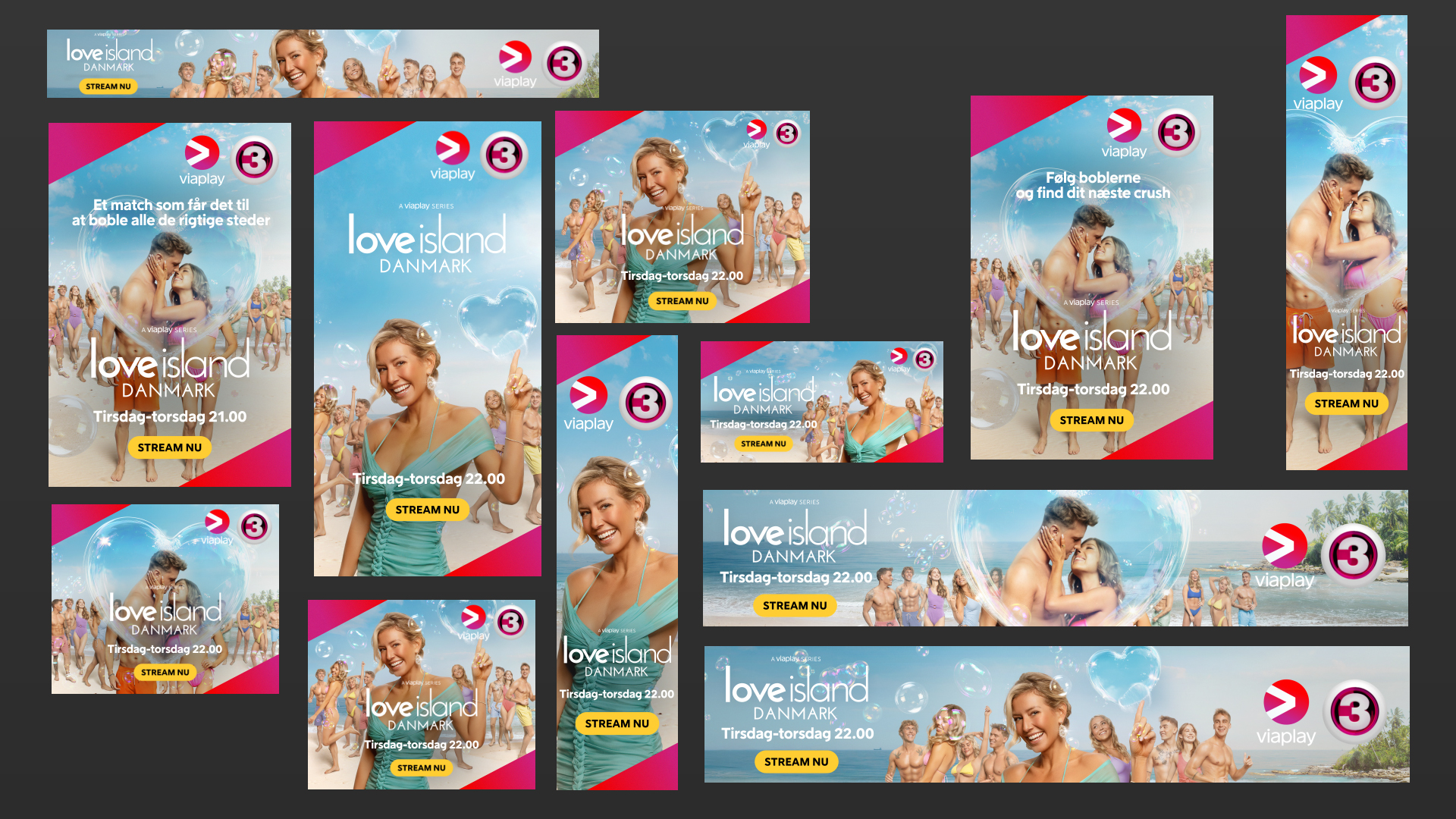
A responsive banner-production system for Viaplay that turned dozens of manually maintained layouts into one adaptive After Effects setup. I combined brand rules, responsive layout logic, reusable templates and a custom production interface so teams could generate large campaign sets faster, with fewer inconsistencies and much less repetitive fixing.
Brief
Viaplay regularly produces campaign banners across many formats, platforms and regions, often with several campaign states and local variations. Existing Photoshop templates helped, but each new campaign still involved a lot of manual interpretation, repositioning and repeated brand checks.
The brief was to make production faster and more consistent without removing the flexibility designers needed when real campaigns inevitably refused to behave like the example file.
The Challenge
This was not really a 'make a template' problem. It was a rules problem.
Viaplay's identity has precise typography, spacing, logo and hierarchy requirements, while campaign content can vary wildly: text titles, custom title artwork, portrait or landscape imagery, multiple logos, disclaimers and regional differences. On top of that, a square layout cannot simply be scaled into an extreme landscape banner and still look designed.
The system needed to understand when to resize, when to reposition and when to change layout strategy entirely, while remaining usable by people who did not want to become expression programmers.
Execution
I built one After Effects master system driven by relative positioning, proportional spacing and aspect-ratio logic. Elements responded to composition size rather than fixed pixel coordinates, while layout rules switched between structures when proportions crossed defined thresholds.
Artwork handling was also adaptive. The system could choose portrait or landscape sources, support text or graphic title treatments, apply sensible defaults and expose controlled overrides when automation was not enough.
To make the system practical, I developed a custom ScriptUI panel for campaign text, metadata, versions, output sizes, selective rendering and persistent project data. The interface hid the complexity while keeping the designer in control.
What began as a template ended up behaving much more like a small production application built inside After Effects.
Stills & Styleframes
Results
The system reduced repetitive setup and made branding behaviour much more predictable across large banner sets. Common early feedback around spacing, logo scale and hierarchy was handled by the rules rather than rediscovered on every campaign.
Large groups of outputs could be produced and updated much faster, while non-technical users had a clearer and safer way to manage versions and renders.
The biggest win was not simply speed. It was moving production attention away from preventable layout fixes and back toward the campaign itself.
Personal Reflection
This was one of the projects where 'Motion Designer' stopped being a very useful description of the job.
The interesting part was translating visual judgement into rules without making the result rigid. Every edge case forced a choice between automation and human control, and getting that balance right mattered more than writing clever code.
I like projects like this because they improve the work twice: first the design, then the way everyone has to make it.